TOTVS RM
Official TOTVS RM Module
The modules are currently under the name Boleto Simples and will be migrated and updated gradually.
TOTVS is the leading company in the Brazilian ERP market. It has several management systems, including RM.
The integration performs boleto generation from titles registered in accounts receivable and allows automatic payment through scheduled processes.
Source Code
The source code of this module is not made available.
Requirements
- RM 12.1.28.216 or higher
Download
Installation
⦁ Access the Global Services/Metadata/Project menu, where the metadata projects available in the file should be imported:
"BoletoSimples-TOTVSRM.TotvsMD".
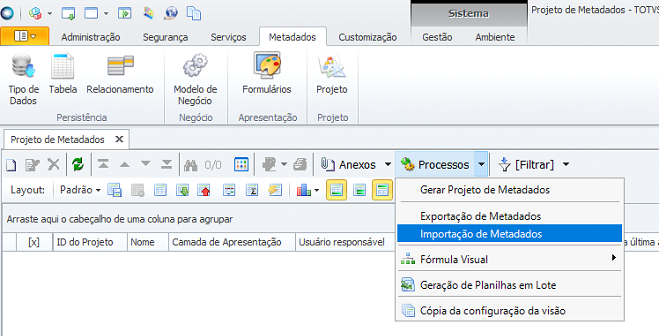
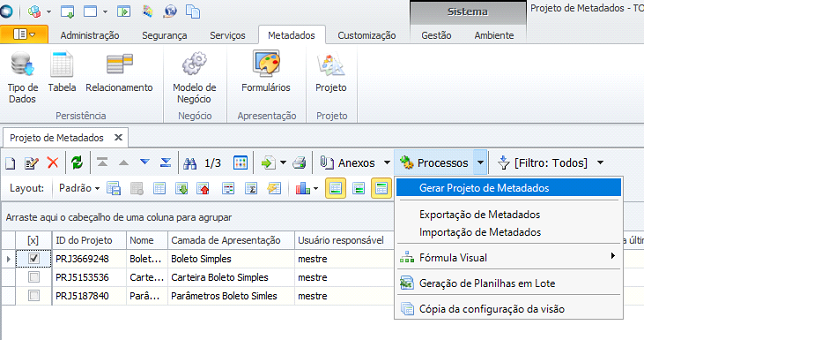
After import, the "Generate Metadata Project" process must be executed for each of the imported projects.
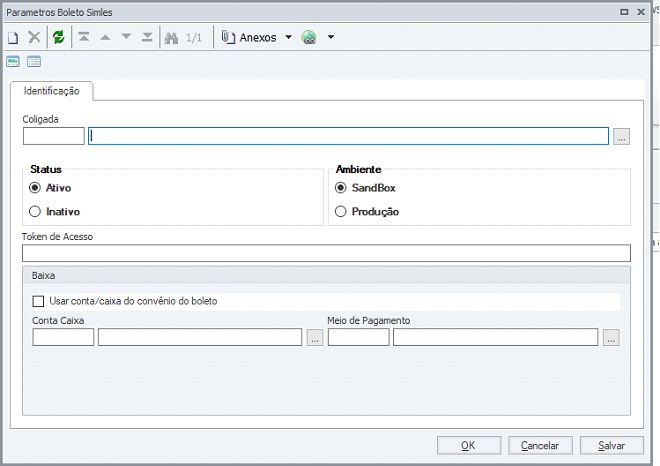
⦁ Access the Financial Management/Customization/Boleto Simples Parameters menu, where the following fields should be defined:
Status: defines whether the integration is active or inactive.
Environment: defines the environment being integrated with Boleto Simples.
Access Token: the access token from the Boleto Simples environment must be informed.
Use Cash Account associated with the boleto agreement: defines whether the cash account associated with the boleto agreement will be used when making the payment performed by the 'Boleto Simples Status Check' process.
Cash Account: defines the cash account that will be used when making the boleto payment, if the parameter above is unchecked.
Payment Method: defines the payment method that will be used in the payment made by the 'Boleto Simples Status Check' process.
⦁ Access the Management/Visual Formula/Visual Formula menu where the visual formulas responsible for the integration with Boleto Simples should be imported, available in the file:
"BoletoSimples-TOTVSRM.TotvsWF"
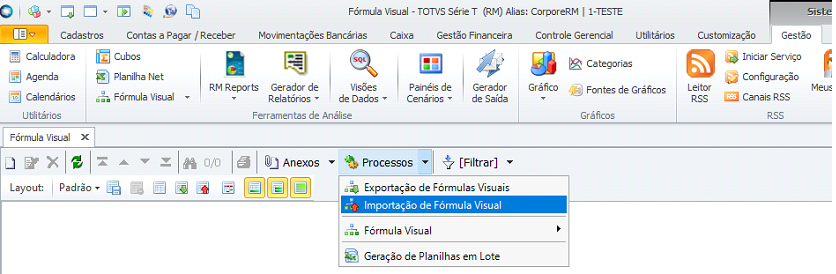
The "Import Triggers" option must be checked on the Parameters tab for each of the visual formulas.
Usage:
⦁ After saving the record in the TOTVS Financial Management agreement registration, the integration will be done by including a portfolio in Boleto Simples. If the agreement has already been integrated with Boleto Simples, the information changed in the agreement will be changed in Boleto Simples.
⦁ After execution of the boleto inclusion process in TOTVS Financial Management, the integration will be done by including the boleto in Boleto Simples, if the agreement associated with the boleto is integrated. The status of the boleto remittance in TOTVS Financial Management will be changed to Sent.
⦁ To update the boleto status in TOTVS Financial Management, the visual formula "Boleto Status Check" must be executed, in the Management/Visual Formula/Execute menu, where the boleto status will be checked in Boleto Simples. If the boleto has a status of "Paid" or "Canceled" in Boleto Simples, the boleto will be paid or canceled in TOTVS Financial Management respectively. This visual formula can be scheduled. A log of each execution is generated in the RM.NET\Processes\FV folder.
Disclaimer
TOTVS RM®️ and TOTVS®️ are registered trademarks of TOTVS®️.