Security
When receiving an event notification request, it is very important to validate whether the request really came from Kobana and was not forged by a third party.
Intrusion Scenario
Let's consider that the integration you are developing is between Kobana and an e-commerce system. When receiving the bank_billet.paid event, which occurs when a boleto is paid, the e-commerce system releases the order for merchandise delivery to be made.
Imagine that a hacker discovers the URL of the e-commerce system that receives notifications and sends a forged notification, as if Kobana was sending it. In this case, the boleto being paid event did not happen, but your system will release the order anyway.
How to Protect Yourself
To protect yourself from this type of attack, it is necessary to implement validation before processing all requests, which certifies that the request was sent by Kobana.
All requests made by Kobana come with a signature in the X-Kobana-Signature header. The signature is an encrypted string based on the content of the request and the webhook Secret Key.
To validate whether the request is genuine, you need to generate the signature and compare it with the signature in the request header. If the received signature equals the generated signature, the request is valid and secure.
A hacker, without access to the Secret Key, cannot generate the signature and consequently cannot forge the request.
It is very important to keep the Secret Key safe, i.e., not putting it in the source code of the system. It is recommended to store it as an environment variable on the production server or in a secure and encrypted configuration system.
Anyone with access to the Secret Key is able to forge requests as if they came from Kobana. If you believe the Secret Key has leaked in any way, it is advisable to renew the key on the webhook data display page.
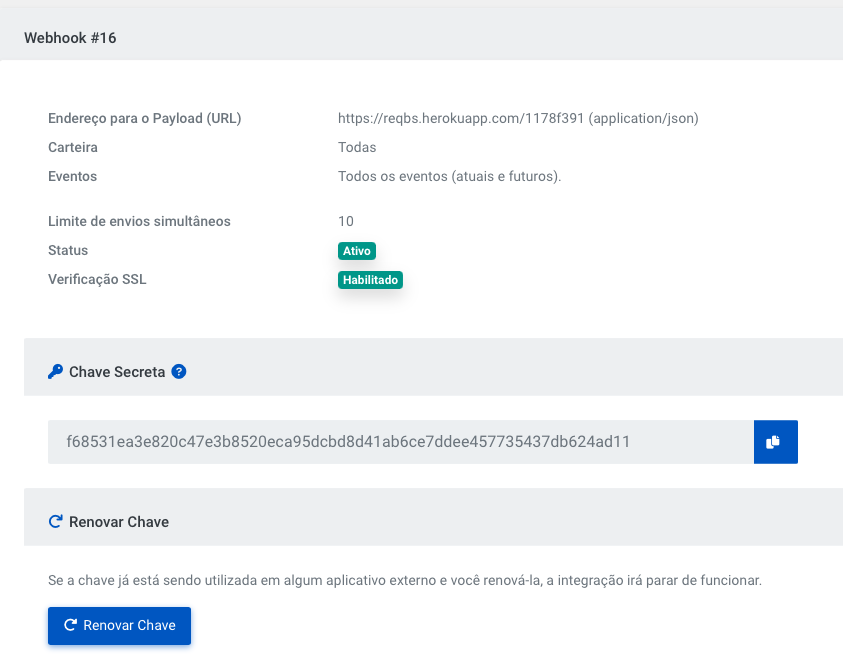
Webhook Secret Key
To get the Secret Key of the webhook, go to the Webhooks page in the Integrations -> Webhooks -> Accounts menu and select the webhook in question.
Click copy on the blue button.
Code Examples
- Ruby
- PHP
- C#
- JavaScript
- Java
# The example below is using the minimalist framework in Ruby,
# called [Sinatra](http://www.sinatrarb.com/).

require 'sinatra'
require 'json'

post '/callbacks/kobana' do
  verify_signature

  payload = JSON.parse(request_body)
  "Event Code: #{payload['event_code']}"
end

def request_body
  @request_body ||= request.body.read.to_s
end

def secret_key
  ENV['WEBHOOK_SECRET_KEY']
end

def signature_from_request
  request.env['HTTP_X_KOBANA_SIGNATURE'].split('=').last
end

def generated_signature
  OpenSSL::HMAC.hexdigest(OpenSSL::Digest.new('sha256'), secret_key, request_body)
end

def verify_signature
  return halt 500, "Signatures didn't match!" unless Rack::Utils.secure_compare(signature_from_request, generated_signature)
end
define('WEBHOOK_SECRET_KEY', 'my_shared_secret');

function verify_webhook($data, $hmac_header)
{
  $calculated_hmac = hash_hmac('sha256', $data, WEBHOOK_SECRET_KEY, true);
  return ($hmac_header == $calculated_hmac);
}

$hmac_header = explode("=", $_SERVER['HTTP_X_KOBANA_SIGNATURE'])[1];
$data = file_get_contents('php://input');
$verified = verify_webhook($data, $hmac_header);
error_log('Webhook verified: '.var_export($verified, true)); //check error.log to see the result
// C# example developed by Davi Kendy Yorozuya
private string ObterChave(string key, string message){
  Encoding encoding = Encoding.UTF8;

  var keyByte = encoding.GetBytes(key);
  using (var hmacshaSHA256 = new HMACSHA256(keyByte)){
 hmacshaSHA256.ComputeHash(encoding.GetBytes(message));

  return ByteToString(hmacshaSHA256.Hash);
  }
}

public string ByteToString(byte[] buff){
  string sbinary = "";
  for (int i = 0; i < buff.Length; i++)
  sbinary += buff[i].ToString("X2"); /* hex format
  */
  return sbinary;
}
//Developed by Maria Paula
//middleware to capture rawBody
app.use(function (req, res, next) {
    req.rawBody = "";
    req.on("data", (chunk) => {
      req.rawBody += chunk;
    });
    next();
  });

//validate signature
const compareSha = (req, webHookSecretKey) => {
  const requestSignature = req.get("x-kobana-signature").split("=")[1];

  const computedSignature = crypto
    .createHmac("sha256", webHookSecretKey)
    .update(req.rawBody)
    .digest("hex");

  return crypto.timingSafeEqual(
    Buffer.from(computedSignature, "utf8"),
    Buffer.from(requestSignature, "utf8")
  );
};
// Must be executed with the command:
// javac WebhookServer.java && java WebhookServer <secretKey>
// where <secretKey> is the secret key of your webhook, necessary for signature validation.

// Example execution:
// javac WebhookServer.java && java WebhookServer 1234567890abcdef1234567890abcdef

// To use with Kobana's app, you can use a tool like ngrok to expose the local server to the internet.
// The mini-server implemented below listens on the /webhook route and validates the received webhook signature.

import com.sun.net.httpserver.HttpServer;
import com.sun.net.httpserver.HttpHandler;
import com.sun.net.httpserver.HttpExchange;

import java.io.OutputStream;
import java.net.InetSocketAddress;
import java.security.InvalidKeyException;
import java.security.NoSuchAlgorithmException;

import javax.crypto.Mac;
import javax.crypto.spec.SecretKeySpec;

public class WebhookServer {
    public static void main(String[] args) throws Exception {
        HttpServer server = HttpServer.create(new InetSocketAddress(8080), 0);
        String secretKey = args[0];
        server.createContext("/webhook", new WebhookHandler(secretKey));
        server.setExecutor(null); // default executor
        server.start();
        System.out.println("Server started on port 8080");
    }

    static class WebhookHandler implements HttpHandler {
        private final String secretKey;

        public WebhookHandler(String secretKey) {
            this.secretKey = secretKey;
        }

        @Override
        public void handle(HttpExchange exchange) {
            try {
                if ("POST".equals(exchange.getRequestMethod())) {
                    byte[] requestBody = exchange.getRequestBody().readAllBytes();
                    String requestBodyString = new String(requestBody);
                    System.out.println("Received webhook payload:");
                    System.out.println(requestBodyString);

                    System.out.println("Received headers:");
                    exchange.getRequestHeaders().forEach((key, value) -> {
                        System.out.println(key + ": " + String.join(", ", value));
                    });

                    String receivedSignature = exchange.getRequestHeaders().getFirst("x-kobana-signature").split("=")[1];
                    System.out.println("Received signature: " + receivedSignature);
                    String computedSignature = computeHmacSHA256(secretKey, requestBodyString);
                    System.out.println("Computed signature: " + computedSignature);
                    if (receivedSignature != null && receivedSignature.equals(computedSignature)) {
                        System.out.println("Signature verified successfully.");
                    } else {
                        System.out.println("Signature verification failed.");
                    }

                    String response = "Webhook received";
                    exchange.sendResponseHeaders(200, response.length());
                    OutputStream os = exchange.getResponseBody();
                    os.write(response.getBytes());
                    os.close();
                } else {
                    exchange.sendResponseHeaders(405, -1); // Method Not Allowed
                }
            } catch (Exception e) {
                e.printStackTrace();
            }
        }

        private String computeHmacSHA256(String key, String data) throws InvalidKeyException, NoSuchAlgorithmException {
            String algorithm = "HmacSHA256";
            Mac mac = Mac.getInstance(algorithm);
            SecretKeySpec secretKeySpec = new SecretKeySpec(key.getBytes(), algorithm);
            mac.init(secretKeySpec);
            byte[] hmacBytes = mac.doFinal(data.getBytes());
            return bytesToHex(hmacBytes);
        }

        private String bytesToHex(byte[] bytes) {
            StringBuilder hexString = new StringBuilder(2 * bytes.length);
            for (byte b : bytes) {
                String hex = Integer.toHexString(0xff & b);
                if (hex.length() == 1) {
                    hexString.append('0'); // pad with leading zero if needed
                }
                hexString.append(hex);
            }
            return hexString.toString();
        }

    }
}
Some observations are important:
- The signature is generated following the
HMACstandard withSHA256; - The signature sent in
X_KOBANA_SIGNATUREalways starts withsha256=and the value after the=should be used in the comparison between our key and the key that will be generated by you; - The signature must be generated using the webhook Secret Key, which is individual and unique per webhook and per environment (
SandboxorProduction), and the content (body) of thePOSTrequest sent in RAW (without any pre-processing by your server or lib) (request.body); - The Secret Key should not be hard-coded in the source code and it is recommended that it be stored in an environment variable;
- It is not recommended to use the
==operator to compare the received signature and the generated signature. Methods likeRack::Utils.secure_compareperform a secure comparison against some types of timing attacks. Research how to do secure comparison in the language you are using.